
Today I visited the Adalaj stepwell, just outside Ahmedabad. Five storeys of carved sandstone going down into the ground, built at the end of the 1400s, still cool inside on a warm afternoon. If you're anywhere near Gujarat, go.
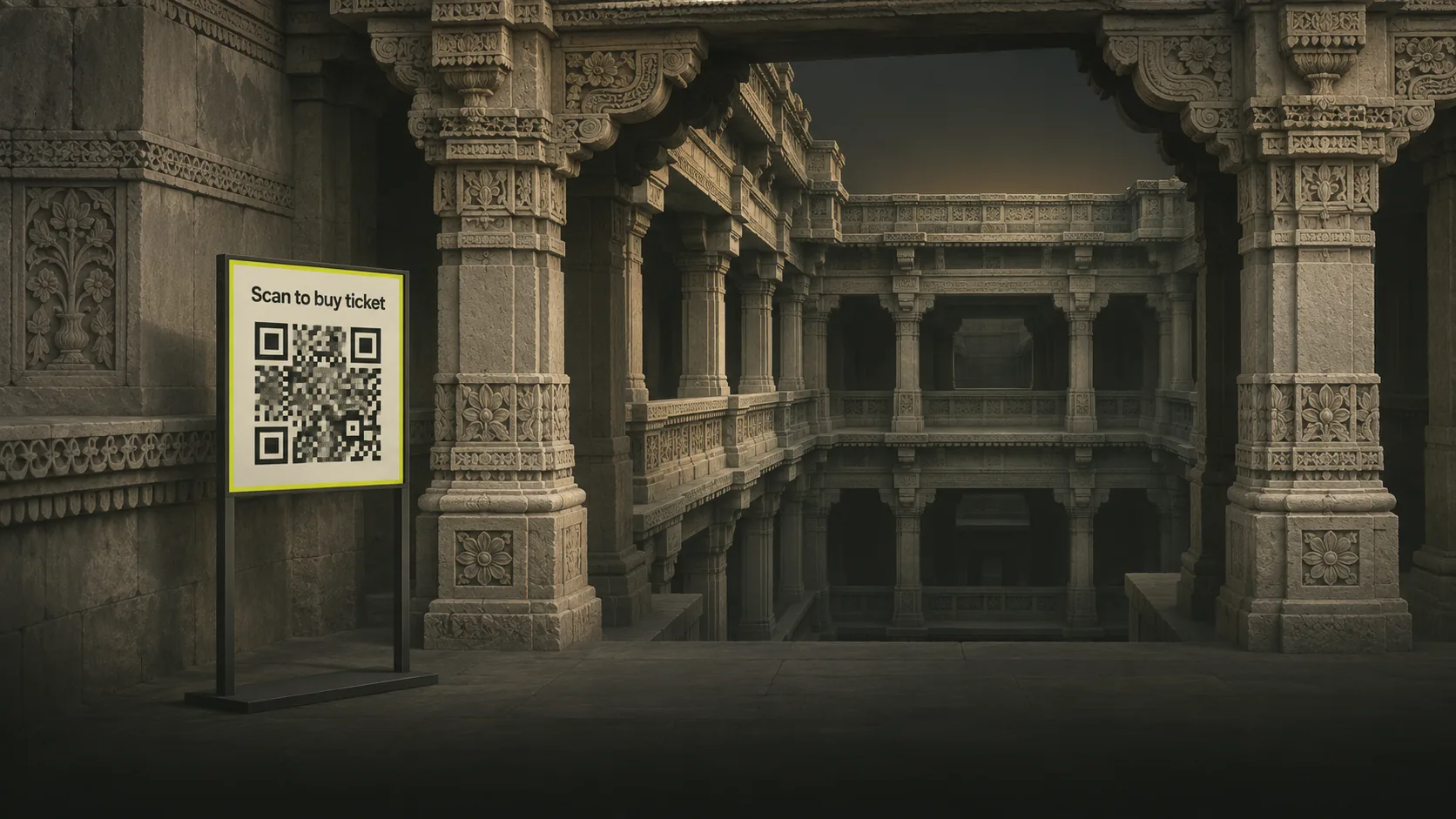
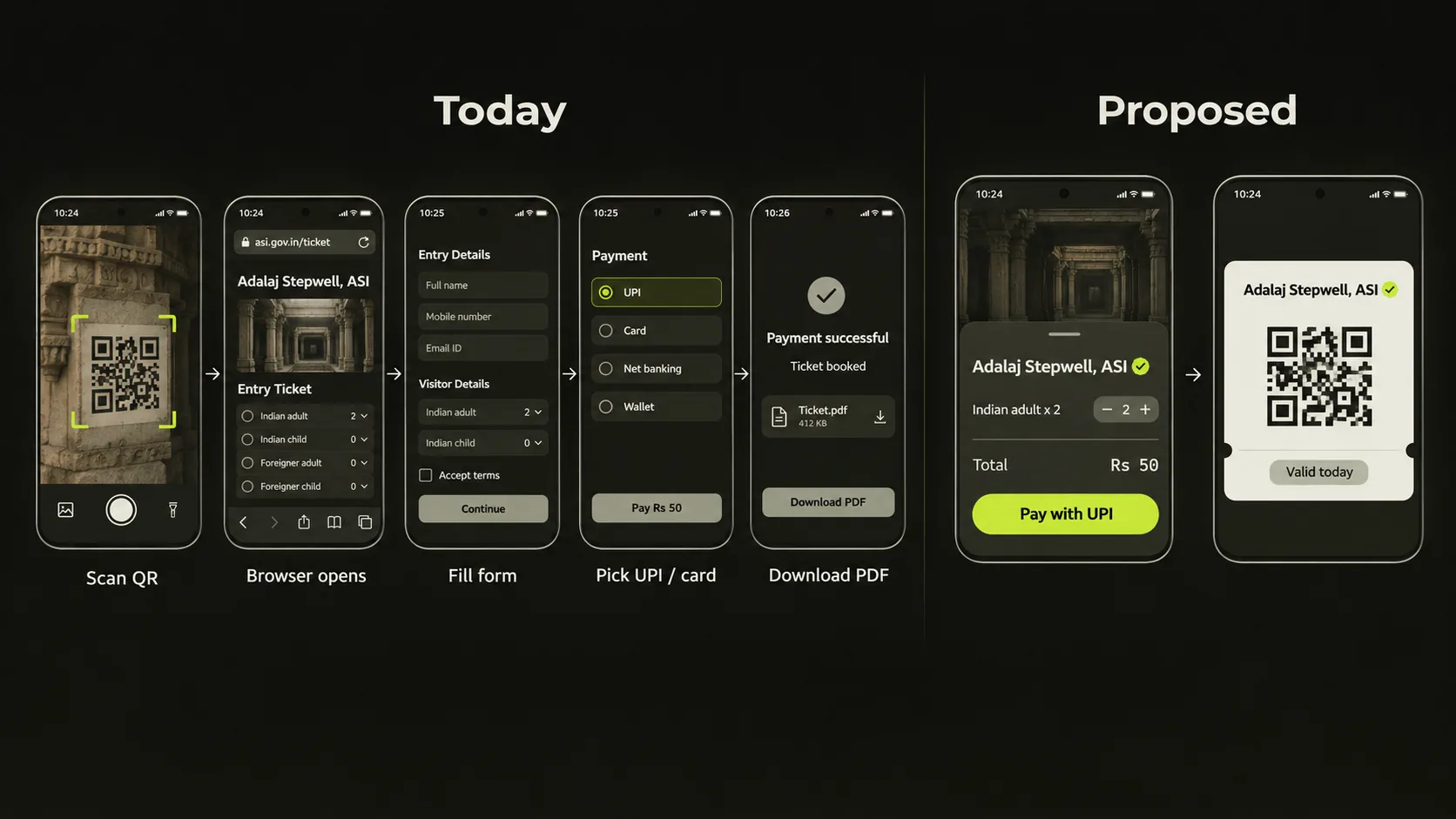
To get in, I needed a ticket. Right outside the gate there was a large QR code. I scanned it, expecting my UPI app to open. Instead, my browser opened the Archaeological Survey of India's ticketing website.
On that website I picked the monument, entered the number of people, and then chose how to pay: UPI or a card. I picked UPI. The website handed me back to my UPI app. I paid. The app handed me back to the browser. The browser showed me a ticket.
Five screens, two apps, one web form. To pay a fixed price for a fixed thing at a fixed place.
Standing in the queue, I kept thinking: the only part of that flow that actually mattered was the UPI payment. Everything else was a website doing a job that my UPI app was already sitting right there to do. So why isn't this in UPI?
What is the actual problem?
To be fair, the system worked. I got in. The ticket was valid. Nobody was rude to me.
But look at what happened from the phone's point of view:
- Camera scans a QR code that contains a normal
https://link. - Browser loads a website. On mobile data, at a monument, in the sun.
- I fill a form: monument, date, number of visitors, nationality category.
- The website creates a payment and sends me to a payment page.
- I choose UPI. The page fires a UPI intent. My UPI app opens.
- I enter my PIN.
- My UPI app sends me back to the browser, which polls to see whether the payment went through.
- The browser shows a ticket, usually as a page or a PDF I have to remember to save.
Steps 1 to 5 and 7 to 8 exist because a QR code on a stand can't tell my UPI app "this is a ticket counter, here's what's for sale". UPI only knows one question: who do I pay, and how much?
And every one of those steps is a place where things go wrong. The page doesn't load on weak signal. The redirect back to the browser fails, so you've paid but have no ticket. The tab gets closed. There's a fake QR sticker pasted over the real one, which takes you to a lookalike website. I saw a family in front of me get stuck at exactly the "paid, but the page is spinning" stage.
Meanwhile, everyone in that queue already had Google Pay, PhonePe, Paytm or BHIM open and ready to go.
UPI already does "look something up, then pay"
Here's the thing that made me think this isn't a crazy ask. NPCI already built this pattern once.
Bharat BillPay (BBPS) works like this: you pick a biller (your electricity company), enter your consumer number, and your app fetches the bill from the biller through NPCI's network. You see the amount, you pay, and the biller gets told. Your app never visits the electricity company's website. Billers register centrally, so your app knows the biller is real.
That's "fetch, then pay". A monument ticket is "fetch a menu, choose, then pay". Same shape, one extra step.
UPI also already has:
| What already exists | What it does | Why it matters here |
|---|---|---|
UPI QR and intent links (upi://pay?...) | Encode who to pay and how much | The scan-to-pay habit is already universal |
| Bharat BillPay | Fetch an amount from a registered biller, then pay | Proves a central registry plus fetch works at national scale |
| UPI One World | UPI wallet for foreign tourists | Foreign visitors at monuments could pay the same way |
| UPI 123PAY | UPI on feature phones | A path for people without smartphones |
| UPI Lite | Small payments with less round-tripping | Ticket prices are exactly this size |
All the hard parts exist: identity, money movement, dispute handling, refunds, a registry of trusted entities. What's missing is a tiny bit of structure on top: a catalog, a quote and a pass.
So here's my proposal. I'm calling it UPI Pass.
UPI Pass, in one paragraph
You scan a QR code at the gate. Your UPI app recognises it as a pass counter, looks up the issuer (ASI) in an NPCI-run directory, and fetches what's on sale. It shows you a native screen: ticket types, prices, a stepper for how many people. You tap Pay, enter your PIN, and the issuer sends a signed pass back into your UPI app. At the gate, staff scan that pass with a phone or turnstile, which can check the signature even without internet.
No browser. No form. No PDF. One app.
The rest of this post is the technical document: who's involved, the flow step by step, the QR format, the APIs, the pass format, how a UPI app would build it, and the edge cases. I've written it for developers and architects who've never worked on payments, so there's a glossary first.
Glossary for people who haven't built on UPI
| Term | What it means |
|---|---|
| NPCI | National Payments Corporation of India. Runs the UPI network (the "switch") that connects banks and apps. |
| PSP app / TPAP | The app you use: Google Pay, PhonePe, Paytm, BHIM, your bank's app. |
| VPA | Virtual Payment Address, like asi.adalaj@sbi. Where money goes. |
| Intent / QR | A upi://pay?... link, opened by tapping or scanning, that pre-fills a payment. |
tr | Transaction reference field in a UPI intent. The merchant's order ID. |
| Issuer | In this proposal: whoever sells the pass. ASI, a state archaeology department, a museum, a metro. |
| Pass Service | A small API the issuer runs (or a vendor runs for them) that UPI Pass talks to. |
| Pass Directory | A new NPCI-run registry of issuers, their endpoints and public keys. Like BBPS's biller registry. |
| Verifier | The thing at the gate that checks your pass: a staff phone app or a turnstile. |
Design goals
Before the design, the rules I held it to:
- The UPI app never opens a web page. All UI is rendered natively from structured data. This kills the fake-website problem.
- Trust comes from NPCI, not from the QR code. The QR only says which issuer and location. Everything else is looked up through the directory.
- The money part is plain UPI. No new payment rails. The pass layer sits around an ordinary UPI collect-free push payment.
- Passes verify offline. Monuments have bad signal. A gate must be able to check a pass with zero network.
- Tiny for issuers. If ASI can run BBPS-style integration, it can run this. Four endpoints.
- Minimal personal data. A monument doesn't need my name. Collect only what pricing actually needs (for example, Indian or foreign visitor).
- Graceful fallback. An older UPI app that doesn't understand UPI Pass should still get the user to a ticket.
Who's involved
flowchart TD
    QR["Gate QR code"] -->|scan| App["UPI app<br/>GPay · PhonePe · Paytm · BHIM"]
    App -->|pass + payment messages| Switch["NPCI switch<br/>UPI + Pass"]
    Switch <-->|lookup| Dir["Pass Directory<br/>issuers · keys · endpoints"]
    Switch --> Issuer["Issuer Pass Service<br/>ASI"]
    Issuer -->|money lands in| Bank["Issuer's bank"]
    Issuer -.->|keys + revocations, synced daily| Gate["Gate verifier<br/>phone or turnstile"]
A deliberate choice here: the UPI app talks to the issuer through the NPCI switch, the same way BBPS bill fetch does, not directly over the internet. That gives NPCI one place to enforce timeouts, rate limits and message formats, and means the issuer only has to integrate with one party instead of every UPI app.
The flow, step by step
Here's the whole thing for two adults at Adalaj. Only step 6, highlighted, moves money; it's an ordinary UPI payment.
flowchart TD
    S1["1 · Scan the gate QR<br/>You → UPI app"]
    S2["2 · Resolve issuer 'asi'<br/>UPI app → NPCI → Pass Directory"]
    S3["3 · Fetch today's catalog<br/>NPCI → ASI Pass Service"]
    S4["4 · Pick 2 × Indian visitor<br/>native screen in the UPI app"]
    S5["5 · Get a signed quote<br/>orderId · ₹40 · 10 min expiry"]
    S6["6 · Pay with your UPI PIN<br/>plain UPI payment, tr = orderId"]
    S7["7 · Credit confirmed<br/>Bank → ASI Pass Service"]
    S8["8 · Signed passes delivered<br/>ASI → NPCI → UPI app"]
    S9["9 · Show pass at the gate<br/>verifier checks it offline"]
    S1 --> S2 --> S3 --> S4 --> S5 --> S6 --> S7 --> S8 --> S9
    classDef pay fill:#c8ef3c,stroke:#c8ef3c,color:#12130d
    class S6 pay
In words:
- Scan. The QR at the gate contains a
upi://passlink with an issuer ID and a location code. - Resolve. The app asks the Pass Directory (via NPCI) who
asiis. It gets back a display name, a logo, a "verified government issuer" flag, the issuer's public keys, and whether the location is active. - Catalog. The app asks for what's on sale at
GJ-ADJtoday. The issuer returns a signed catalog: ticket types, prices, which categories need a declaration, opening hours, any time slots. - Choose. The app renders a native bottom sheet. User picks two Indian adult tickets.
- Quote. The app sends the selection. The issuer returns a quote: an
orderId, the exact amount, and an expiry (say, ten minutes). This locks the price so it can't change between choosing and paying. - Pay. A normal UPI payment to the issuer's VPA with
trset to theorderIdandamset to the quoted amount. The user enters their PIN like any other payment. - Issue. When the issuer's bank confirms the credit, the issuer creates the passes, signs them, and sends them back through the switch to the user's app.
- Store. The app saves the passes in a "Passes" section, alongside the payment in history.
- Enter. At the gate, the app shows the pass as a QR code. The verifier checks the signature using the issuer's public key, checks the date and location, and marks it as used.
The money in step 6 is not special. It's the same UPI payment that happens a few hundred million times a day. Everything new happens before and after it.
The gate QR code
UPI intents today look like this:
upi://pay?pa=asi.adalaj@sbi&pn=ASI%20Adalaj&am=20.00&cu=INR&tn=Entry%20ticket
That works for a fixed amount, but it can't handle "how many people?" or "which category?", and it says nothing about getting a ticket back.
UPI Pass adds a new path on the same scheme:
upi://pass?v=1&iss=asi&loc=GJ-ADJ&fb=https%3A%2F%2Fasi.example.gov.in%2Ft%2FGJ-ADJ
| Param | Required | Meaning |
|---|---|---|
v | yes | Protocol version. Starts at 1. |
iss | yes | Issuer ID, registered in the Pass Directory. |
loc | yes | Location or counter code, defined by the issuer. |
fb | no | Fallback web URL for apps that don't support UPI Pass yet. |
Notice what's not in there: no price, no VPA, no endpoint URL. The QR is just a pointer. If someone pastes a fake sticker on top, the worst it can do is point at an issuer ID. If that ID isn't in the directory, the app refuses. If it is in the directory, it's a real, verified issuer, and the app shows its verified name in large text before the user pays anything.
Fallback. During rollout, apps that don't know upi://pass will ignore it or show an error. Two ways to handle that:
- The gate sign keeps a second, smaller "Can't scan? Use this" web QR for the current website, or
- Phone camera apps (which already hand off
upi://links) can openfbwhen no installed app claimsupi://pass.
The Pass Directory
This is the one new piece of central infrastructure. It's a registry, much like BBPS's list of billers, that maps an issuer ID to everything an app needs to trust it.
{
  "iss": "asi",
  "displayName": "Archaeological Survey of India",
  "category": "GOVT_HERITAGE",
  "verified": true,
  "logo": "https://directory.npci.example/logos/asi.svg",
  "vpa": "asi.passes@sbi",
  "keys": [
    { "kid": "asi-2026-11", "alg": "EdDSA", "crv": "Ed25519", "x": "<base64url public key>", "status": "active" },
    { "kid": "asi-2026-05", "alg": "EdDSA", "crv": "Ed25519", "x": "<base64url public key>", "status": "verify-only" }
  ],
  "locations": {
    "GJ-ADJ": { "name": "Adalaj Stepwell", "state": "GJ", "status": "open", "tz": "Asia/Kolkata" },
    "UP-TAJ": { "name": "Taj Mahal", "state": "UP", "status": "open", "tz": "Asia/Kolkata" }
  }
}
Two things worth calling out:
- Key rotation. Issuers publish more than one key. New passes are signed with the
activekey; older passes still verify againstverify-onlykeys until they expire. This is the same idea as JWKS in OAuth, if you've done login integrations. - The VPA lives here, not in the QR or the catalog. The app always pays the directory's VPA for that issuer. Nobody can redirect the money by changing a sign or compromising a catalog response.
The four issuer APIs
The issuer (or a vendor on its behalf) runs a Pass Service. The NPCI switch calls it; UPI apps never call it directly. Every response is signed with the issuer's key so the app can check it wasn't altered in transit.
| Endpoint | Called when | Returns |
|---|---|---|
getCatalog | User scans the QR | What's on sale at this location, today |
createQuote | User taps Continue | An orderId, exact amount, expiry |
issuePass | Payment credit is confirmed | One or more signed passes |
getPassStatus | App reopens, or something timed out | Pass(es) for an orderId, or the current state |
getCatalog
{
  "iss": "asi",
  "loc": "GJ-ADJ",
  "date": "2026-11-09",
  "currency": "INR",
  "open": "06:00",
  "close": "18:00",
  "items": [
    { "sku": "ADULT_IN", "label": "Indian / SAARC / BIMSTEC visitor", "price": "20.00", "max": 10 },
    { "sku": "ADULT_FOREIGN", "label": "Foreign visitor", "price": "300.00", "max": 10, "declaration": "FOREIGN_NATIONAL" },
    { "sku": "CHILD_U15", "label": "Child under 15", "price": "0.00", "max": 10 }
  ],
  "notes": ["Carry a photo ID for category checks at the gate."],
  "terms": "https://asi.example.gov.in/terms",
  "sig": "eyJhbGciOiJFZERTQSIsImtpZCI6ImFzaS0yMDI2LTExIn0..."
}
The ₹20 Indian visitor fare is what I paid at Adalaj; the other prices are placeholders for illustration.
The catalog is data, not UI. The app decides what it looks like. That's what lets Google Pay and PhonePe each render it in their own design language while the issuer writes it once.
createQuote
Request:
{
  "iss": "asi",
  "loc": "GJ-ADJ",
  "date": "2026-11-09",
  "lines": [{ "sku": "ADULT_IN", "qty": 2 }],
  "payerApp": "phonepe",
  "idempotencyKey": "6b7f0c2e-1d0a-4a3e-9c1f-0b8f4f7c2d11"
}
Response:
{
  "orderId": "ASI-GJADJ-20261109-7Q4K9M",
  "amount": "40.00",
  "currency": "INR",
  "lines": [{ "sku": "ADULT_IN", "qty": 2, "unit": "20.00" }],
  "expiresAt": "2026-11-09T11:42:00+05:30",
  "sig": "eyJhbGciOiJFZERTQSIsImtpZCI6ImFzaS0yMDI2LTExIn0..."
}
The idempotencyKey matters. If the user taps Continue twice on a slow connection, the issuer returns the same quote instead of creating two orders. If you've never built an API like this, idempotency keys are the single most useful habit to pick up from payments.
The payment
The app now makes a completely ordinary UPI payment:
pa = asi.passes@sbi          (from the Pass Directory, never from the QR)
am = 40.00                   (from the signed quote)
tr = ASI-GJADJ-20261109-7Q4K9M
tn = Adalaj Stepwell · 2 tickets
The app must refuse to pay if the quote signature doesn't verify or the quote has expired.
issuePass
When the issuer's bank reports the credit for tr = ASI-GJADJ-20261109-7Q4K9M, the issuer creates the passes and sends them back through the switch, tagged with the payer app so the switch knows where to deliver them.
{
  "orderId": "ASI-GJADJ-20261109-7Q4K9M",
  "utr": "631245098765",
  "passes": [
    "6BFOXN*TS0BI$ZD.P9UOL97O4-2HH77HRM3DSPTLRR+%3...",
    "6BFOXN*TS0BI$ZD.P9UOL97O4-2HH77HRM3DSPTLRR+%3..."
  ]
}
Those strings are the passes themselves, explained next.
The pass format
The pass has to fit in a QR code that a cheap phone camera can read in harsh sunlight, and it has to be checkable offline. India's existing systems give us a useful precedent: DigiLocker issues signed documents, and the Aadhaar Secure QR is signed and verifiable offline. The EU's COVID certificates used the same building blocks at continental scale.
So, borrowing proven pieces:
- Payload: a CBOR Web Token (CWT). CBOR is binary JSON; it's much smaller than JSON text.
- Signature: COSE_Sign1 with Ed25519. Small signatures, fast verification on low-end hardware.
- Encoding for QR: Base45, which uses exactly the characters QR codes store efficiently in alphanumeric mode.
Decoded, a pass looks like this:
{
  "iss": "asi",
  "kid": "asi-2026-11",
  "pid": "P-7Q4K9M-1",
  "oid": "ASI-GJADJ-20261109-7Q4K9M",
  "loc": "GJ-ADJ",
  "sku": "ADULT_IN",
  "validFrom": "2026-11-09T06:00:00+05:30",
  "validTo": "2026-11-09T18:00:00+05:30",
  "entries": 1,
  "decl": null,
  "iat": 1794215400
}
No name, no phone number, no UPI ID. The pass says what you're allowed to do, not who you are. If a category needs proof (foreign visitor, student, senior citizen), the gate does what it does today: looks at your ID card. The protocol doesn't need to collect it.
One pass per person, not one per order. That way a family can split up at the gate, and one bad scan doesn't block the whole group.
How the gate verifies
A verifier is an app on a staff phone or a turnstile controller. It syncs once a day (or whenever it has signal) and downloads:
- Issuer public keys from the Pass Directory
- A small revocation list (refunded or cancelled pass IDs)
Then, offline, for every scan:
import { decodeBase45 } from '@/lib/base45';
import { verifyCoseSign1 } from '@/lib/cose';

interface VerifyResult {
  ok: boolean;
  reason?: 'BAD_SIGNATURE' | 'WRONG_LOCATION' | 'NOT_YET_VALID' | 'EXPIRED' | 'REVOKED' | 'ALREADY_USED';
}

export function verifyPass(qr: string, gateLoc: string, now: Date, store: VerifierStore): VerifyResult {
  const cose = decodeBase45(qr);
  const { payload, kid } = verifyCoseSign1(cose, store.keys);
  if (!payload) return { ok: false, reason: 'BAD_SIGNATURE' };

  if (payload.loc !== gateLoc) return { ok: false, reason: 'WRONG_LOCATION' };
  if (now < new Date(payload.validFrom)) return { ok: false, reason: 'NOT_YET_VALID' };
  if (now > new Date(payload.validTo)) return { ok: false, reason: 'EXPIRED' };
  if (store.revoked.has(payload.pid)) return { ok: false, reason: 'REVOKED' };
  if (store.usedCount(payload.pid) >= payload.entries) return { ok: false, reason: 'ALREADY_USED' };

  store.markUsed(payload.pid, now, kid);
  return { ok: true };
}
The markUsed list is local and uploaded later. Could someone screenshot a pass and use it at two different gates of the same monument while both are offline? Yes. For a ₹20 ticket at a site with one entrance, that's an acceptable risk; for sites with many gates, verifiers sync used IDs with each other over the local network. This is a trade-off, and I'd rather state it than pretend offline verification is free.
How Google Pay or PhonePe would build this
From the UPI app's side, UPI Pass is four pieces of work.
1. Teach the scanner a new path
Every UPI app already routes scanned upi:// links. This is one more branch:
type ScanResult =
  | { kind: 'pay'; params: UpiPayParams }
  | { kind: 'pass'; iss: string; loc: string; version: number; fallback?: string }
  | { kind: 'unknown'; raw: string };

export function routeScan(raw: string): ScanResult {
  const url = new URL(raw);
  if (url.protocol !== 'upi:') return { kind: 'unknown', raw };

  // new URL('upi://pass?...') puts "pass" in the host
  if (url.host === 'pass') {
    const version = Number(url.searchParams.get('v'));
    const iss = url.searchParams.get('iss');
    const loc = url.searchParams.get('loc');
    if (version !== 1 || !iss || !loc) return { kind: 'unknown', raw };
    return { kind: 'pass', iss, loc, version, fallback: url.searchParams.get('fb') ?? undefined };
  }

  if (url.host === 'pay') return { kind: 'pay', params: parsePayParams(url.searchParams) };
  return { kind: 'unknown', raw };
}
If the app sees a v it doesn't support, it opens fb instead of guessing.
2. Render the catalog natively
The catalog is a list of items with labels, prices and limits. That maps directly to a bottom sheet with steppers. Apps should not render any issuer-provided HTML or open webviews. If a field like notes contains text, render it as plain text.
What the user should always see before paying:
- The issuer's verified name and badge from the directory, in large type
- The location name from the directory (not from the catalog)
- The line items and total from the signed quote
- The VPA being paid, as every UPI payment screen already shows
3. Add a Passes section
Passes need a home that isn't the payment history. Something like the existing "Tickets" or "Offers" tabs some apps already have:
- Show today's passes on the app's home screen, the same way boarding passes surface in Google Wallet
- Work fully offline once downloaded
- Show each pass's QR at full brightness with the monument name and validity
- "Share pass" to send one person's pass to a family member's phone
4. Handle the messy middle
Most of the engineering effort is here, not in the happy path. See the next section.
Edge cases (where the real work is)
| Situation | What should happen |
|---|---|
| Money debited, pass never arrived | The app calls getPassStatus with the orderId. If the issuer has the credit, it re-sends the passes. If the issuer never got the credit, normal UPI failed-transaction rules apply: the money is auto-reversed within RBI's turnaround time. Either way the user sees a clear status, not a spinning page. |
| App closed mid-payment | Passes are delivered to the app through the switch, not to a screen. Reopening the app fetches them. |
| Paid, but the quote had expired | The issuer must still honour or refund. Rule: if a credit arrives with a known orderId, issue the pass even after expiry, or refund automatically within a fixed time. Never keep the money silently. |
| User changed phones | Passes are tied to the order, which is tied to the UPI transaction. getPassStatus with the UTR from payment history restores them. |
| Refund or cancellation | Issuer refunds via standard UPI refund, adds the pid to its revocation list. Verifiers pick it up on next sync. |
| Site closed unexpectedly (weather, VIP visit) | Directory marks location closed; apps show it before payment. Already-sold passes get auto-refunded by the issuer. |
| Foreign visitor | UPI One World users can pay the same way. The FOREIGN_NATIONAL declaration is a checkbox, and the gate checks the passport as it does today. |
| No smartphone | The ticket window stays. Optionally, UPI 123PAY could support fixed-price single tickets with the pass delivered by SMS as a short code. |
| Fake QR sticker | It can only point to an issuer ID. Unknown IDs are refused; known IDs pay the directory's VPA. The sticker can't redirect money. |
| Issuer's Pass Service is down | Directory health checks mark the issuer degraded; apps show "use the counter" instead of failing after payment. Never take money if createQuote didn't succeed. |
Why not just use what exists?
I asked myself this a few times while writing.
"Just put a fixed-amount UPI QR at the gate." Works for a single ticket type at one price. Breaks with group sizes, categories, time slots, and you get no ticket back, so the gate staff have to check payment SMS on someone's phone. That's what many smaller sites already do, and it's not great.
"Use BBPS." BBPS is the closest thing, and honestly, UPI Pass could be built as an extension of it. But BBPS is designed around bills: an amount already owed to you, fetched by an account number. Tickets need a catalog, user choice, quantities, and a signed artefact back. That's enough new shape to deserve its own spec, even if it reuses BBPS's plumbing and registry.
"Use ONDC." ONDC is great for open commerce between many buyers and sellers. But a monument ticket isn't a marketplace problem. It's a single, government-run counter with one price list. Routing that through a commerce network adds more parties, not fewer.
"Each app can just integrate with ASI." Then ASI integrates with five apps, metros integrate with five apps, every museum integrates with five apps. The value of UPI was always one integration that works everywhere. Same here.
What it would take to ship
Rough order, if I were planning it:
- NPCI publishes the spec: QR format, the four APIs, pass format, directory schema. Like the BBPS spec, it should be public.
- Pilot with one issuer and two apps. ASI is the obvious candidate: hundreds of ticketed monuments, already selling online, already using QR codes at gates. Pick five sites with different conditions: busy (Taj Mahal), remote (Hampi), small (Adalaj).
- Verifier app. A free, open-source gate app for staff phones. This is what makes it cheap for small issuers.
- Open it to other issuers. State archaeology departments, museums, zoos, national parks, metro and bus single-journey tickets, government events.
- Make support mandatory for UPI apps above a size threshold, as NPCI has done for other UPI features.
None of this needs new law, new payment rails or new banks. It needs a spec and a pilot.
So, a question for NPCI and the Ministry of Culture
I'm a developer, not someone who knows what's in NPCI's roadmap. Maybe this is already being built. Maybe there's a good reason it isn't: procurement contracts with the current ticketing vendor, convenience fees that fund the website, a rule about collecting visitor data that I don't know about.
But from where I stood in that queue, here's my question:
India built the world's most used real-time payment system and a national bill-fetch network. Why does buying a ₹20 ticket to a 500-year-old stepwell still need a website?
And some smaller ones, for whoever owns this:
- Would NPCI publish an open spec for structured, non-bill purchases from verified government issuers?
- Could ASI pilot it at a handful of monuments, with the verifier app open-sourced?
- If the answer is "the current system works", what does the data say about failed payments, missing tickets and fake QR codes at monuments?
If you're at NPCI, ASI, MeitY or the Ministry of Culture and this reaches you, I'd genuinely love to hear what I'm missing.
Zooming out
UPI won because it made one thing boring: paying. You don't think about it anymore. You scan, you pay, you walk on.
But the moments around the payment, what am I buying, did I get it, can I prove it, still bounce you between apps and websites. Every government counter, every museum, every metro has its own little website doing the same job slightly differently, and slightly worse than it could be.
The next useful thing UPI could do isn't move money faster. It's to give that "what am I buying" moment the same boring, reliable, works-everywhere treatment. Tickets are the easiest place to start, because the price list is short and the stakes are small.
Feel free to reach out if you have questions, if you've worked on UPI or BBPS and can tell me where this design is wrong, or if you know who at NPCI should read it.