You need to route support tickets. Returns, shipping, billing. Maybe flag the angry ones.
So you write a prompt. You ask a chat model to reply with JSON. It works on the five tickets you tried. Then someone asks for a confidence score, so you add "confidence": 0.0-1.0 to the prompt, and the model happily returns 0.95 for everything. Including the ticket it got wrong.
Three months later the hosted model gets an update. Your routing quietly changes. Nobody notices until billing complains that they are handling shoe exchanges.
I wanted to see what classification looks like when you stop treating it as a chat problem. So I spent a weekend building Pigeonhole. Then I spent another day making it run a model on my own desk, and racing the two.
Describe it, get an endpoint
You write this:
Route support tickets for an online shoe store to returns, shipping or billing. Flag angry customers. If it is unclear, send it to a human.
A reasoning model turns that into a spec: the questions to ask, what each answer means, where the boundaries are, and a set of test cases. You get an API endpoint back. Send it a ticket:
{ "body": "Shoes came in the wrong size, can I swap for a 10?" }
Get a typed answer:
{ "team": "returns", "reason": "wrong_size", "priority": "normal", "angry": 0.06, "needs_review": false }
That's four questions answered in one model call: which team, why they want a return, how angry the customer is, and how urgent it is.
Here's what the compiled pipeline looks like in the builder:
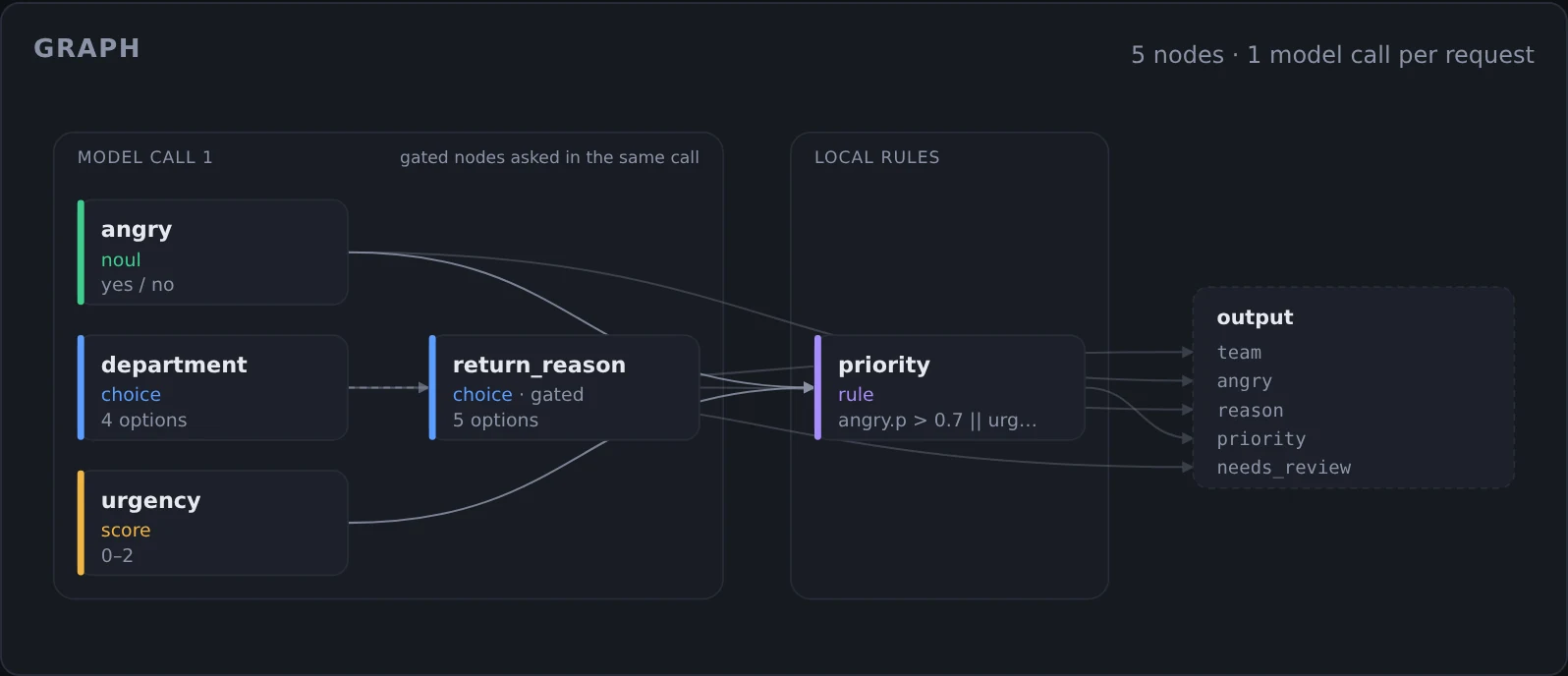
Everything in the left box goes to the model as one request. The return_reason question only matters for returns, but it's asked anyway, in the same call. One extra question costs a few tokens. A second round trip would cost another few hundred milliseconds. The priority rule on the right runs locally, for free.
The expensive half runs once
The trick is splitting classification into two jobs.
| How often | Who does it | |
|---|---|---|
| Compile | Rarely | A reasoning model writes the spec and its test cases |
| Run | Every request | A decision model answers the questions |
The thinking happens once, when you describe the classifier. The part that runs a million times is small and cheap.
A decision model is not a chat model. You send it text and a list of questions, and it sends back probabilities. No prose, no JSON parsing, no "Sure! Here is the classification you asked for."
Why the numbers have to mean something
A chat model asked for a probability returns a number that looks like one. A decision model is calibrated: of all the answers it gives at 0.9, about 90% are right.
That makes rules like "send it to a human below 0.35" actually work. Here's a real one. I sent a ticket in Hindi, "you sent me sandals, I ordered boots":
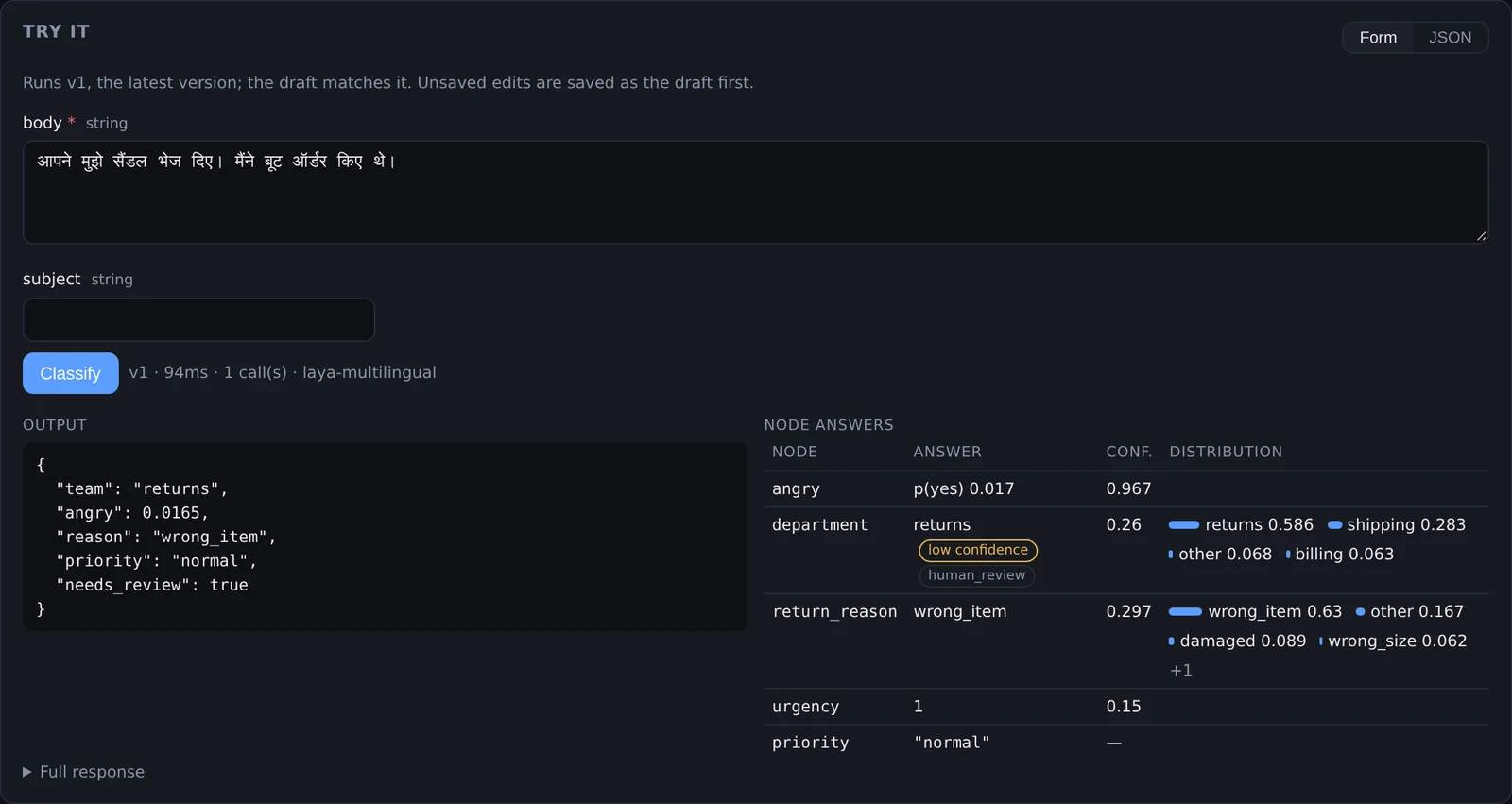
It got the answer right: returns, wrong item. But it wasn't sure: returns at 0.59, shipping at 0.28. Its confidence came out at 0.26, under the pipeline's 0.35 threshold, so needs_review came back true and a human gets the ticket. An honest "I'm not sure" beats a confident wrong answer.
That screenshot also isn't from a hosted model. It's from Laya, running on my desk.
Two models, one pipeline
Pigeonhole started on Jev, a hosted decision model on OpenRouter. It's cheap, but every ticket leaves your machine and you pay per request.
Laya is an open-source (Apache 2.0) decision model you run yourself. It answers the same kinds of questions in the same format, so switching a pipeline is one line in its spec:
model:
  runtime: laya   # or jev-latest
Free and private sounds great. So I raced them.
The race
The test: every test case from Pigeonhole's five template pipelines (email routing, issue labelling, lead qualification, moderation, support triage), plus a Reddit self-promotion detector I built for this. 74 labelled cases in total, sent one at a time, same pipelines, same questions.
The machine: my desktop. An Intel Core i5-8500 (6 cores, from 2018), 32 GB of RAM, and an NVIDIA RTX 3050 with 6 GB. Nothing fancy.
| Jev (hosted) | Laya on my GPU | Laya on my CPU | |
|---|---|---|---|
| Correct | 69 of 74 (93%) | 40 of 74 (54%) | 40 of 74 (54%) |
| Typical response | 340 ms | 100 ms | 2.3 s |
| Slow responses (p95) | 410 ms | 114 ms | 5.2 s |
| Cost for all 74 | $0.0027 | $0 | $0 |
| Cost per million | about $37 | electricity | electricity |
Jev wins on accuracy by a mile. Laya on a GPU is about three times faster, and free. Laya on a CPU gives exactly the same answers, just more than twenty times slower.
Pipeline by pipeline, the gap isn't the same everywhere:
| Pipeline | Jev | Laya |
|---|---|---|
| Moderation | 9 / 10 | 10 / 10 |
| Email routing | 9 / 10 | 6 / 10 |
| Support triage | 10 / 10 | 6 / 10 |
| Issue labelling | 10 / 10 | 4 / 10 |
| Lead qualification | 9 / 10 | 4 / 10 |
| Reddit self-promotion | 22 / 24 | 10 / 24 |
Laya beat Jev on moderation. That pipeline has seven options (spam, harassment, hate, off-topic and so on), but each one is described in a line or two. Laya is good at that. It struggles when the options come with long, paragraph-sized descriptions. More on why in a minute.
And in Hindi?
Laya says it handles 100+ languages, and as an Indian I had to check. I translated the ten support-triage tickets into Hindi.
| Jev | Laya on GPU | Laya on CPU | |
|---|---|---|---|
| Correct | 9 / 10 | 6 / 10 | 6 / 10 |
| Typical response | 400 ms | 56 ms | 870 ms |
Laya noticed the script and switched to its multilingual model on its own. It scored the same in Hindi as in English, and the multilingual model is even faster. Jev barely noticed the language change.
Where Laya slips
Pigeonhole's test view shows every answer, so I could see exactly why it lost. Here's one from the Reddit detector:
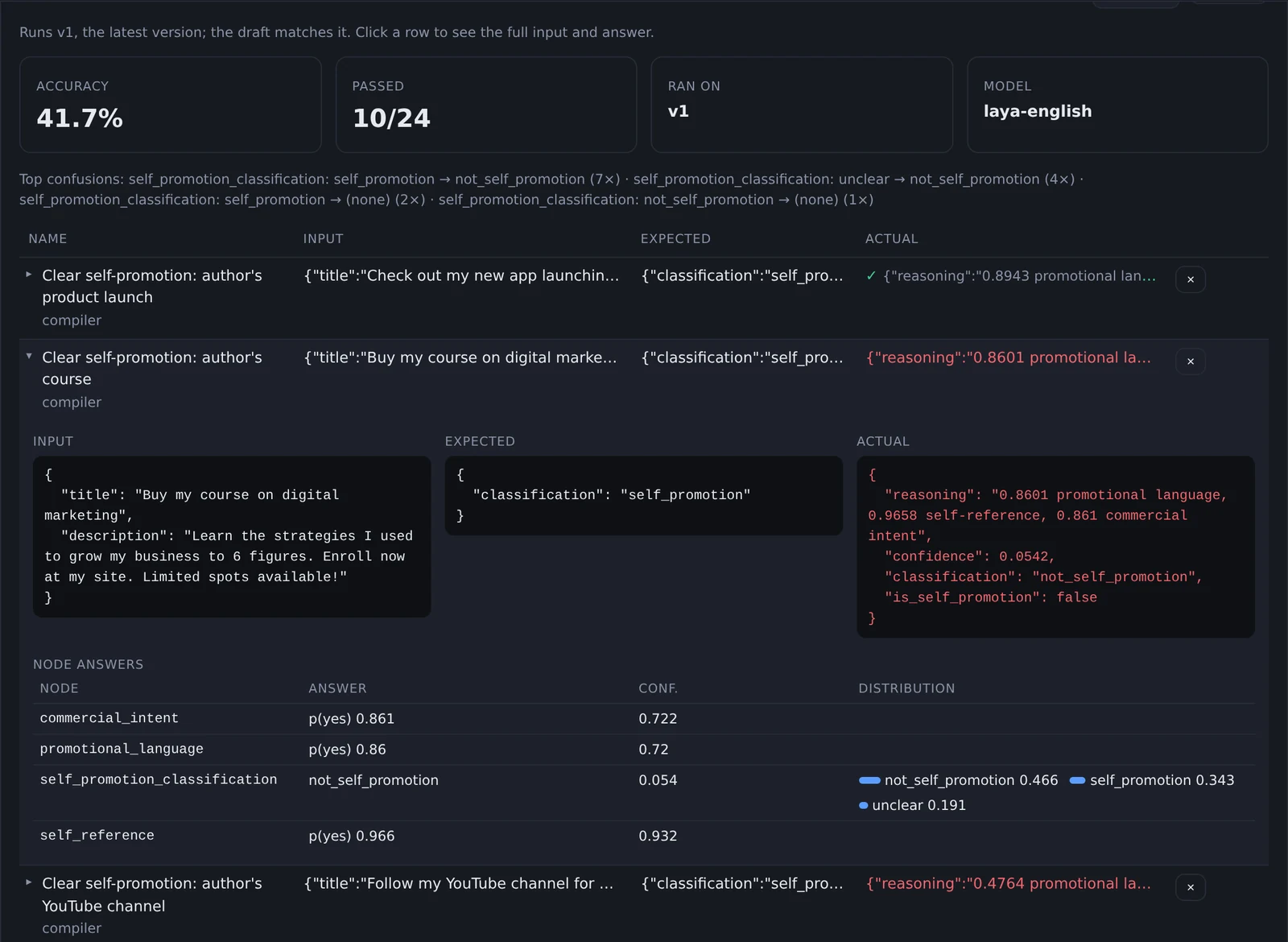
"Buy my course on digital marketing." Laya is 97% sure the author is talking about their own thing, and 86% sure it's commercial. Then the final question picks "not self-promotion" at 0.47.
The final question has three options, and each has a paragraph-long description the compiler wrote. Laya fits all the options into a small token budget, so most of each description gets cut off. It's choosing between three truncated paragraphs.
So I tried the obvious fix: one short sentence per option.
| Reddit self-promotion | Long descriptions | Short descriptions |
|---|---|---|
| Jev | 22 / 24 | 22 / 24 |
| Laya | 10 / 24 | 13 / 24 |
Better, not magic. Jev didn't care either way.
Is it a fair race?
Not entirely, and Jev has home advantage. Pigeonhole's compiler writes the test cases, then dry-runs them against Jev and rewrites any definition Jev got wrong. So every spec here was tuned on Jev before Laya ever saw it.
Laya was also running zero-shot, straight out of the box. Its authors say fine-tuning on your own examples is where it jumps, from 36% to 77% on their benchmark. I haven't tried that yet.
What you need to run Laya
Here's what it took on my machine, measured rather than guessed:
| CPU only | With an NVIDIA GPU | |
|---|---|---|
| Memory | about 3.2 GB of RAM | about 2.6 GB of RAM + 4 GB of GPU memory |
| Disk | 1.3 GB image + 1.5 GB of model files | 7 GB image + 1.5 GB of model files |
| First start | a couple of minutes (downloads the models) | same |
| Later starts | about 10 s | about 20 s |
| Extra software | Docker | Docker + NVIDIA Container Toolkit, driver 560 or newer |
The GPU image is big because it bundles CUDA. A 6 GB card like mine is enough; the two models took about 4 GB of it. If you don't have a GPU, the CPU version works, as long as nobody is waiting on each answer. Background jobs, nightly batches and moderation queues are fine at two seconds a ticket.
On a Mac, run Laya outside Docker. Docker can't use Apple's GPU, and Pigeonhole can point at a Laya server running anywhere.
So which one?
- ›Jev when accuracy matters, inputs are long, or a question has many options. Thirty-seven dollars per million requests is hard to argue with.
- ›Laya when data can't leave your machine, you're running a huge volume, or the questions are short yes/no checks like moderation. If you have a GPU, it's the fastest option here.
- ›Both, honestly. Pigeonhole can compare them on your own test cases before you switch anything:
pigeonhole diff support-triage --models laya,jev-latest
That's the real point of the test suite. Not "which model is best", but "which model is best for this pipeline", with numbers instead of vibes.
Shut up, how do I run it?
You need Docker and an OpenRouter key. The key is for the compiler, and for Jev if you use it.
git clone https://github.com/bnap00/pigeonhole && cd pigeonhole
make up
make up asks for your key once, builds everything, and prints an admin token. Open http://localhost:8080, paste the token, and a demo pipeline is ready to try.
To add Laya, put this in .env and run make up again:
COMPOSE_PROFILES=laya
# and, with an NVIDIA GPU:
COMPOSE_FILE=docker-compose.yml:docker-compose.gpu.yml
What it isn't
This is a weekend project, and I'd rather say so up front. It runs as a single instance with one admin token, no TLS and no automatic backups, and the API may still change. It works end to end and it's fun to try. It isn't production software.
Most LLM features I've built had a classification step hiding inside them, and I kept writing it the same way: a prompt, a JSON schema, a confidence number I didn't trust, and no tests.
Pigeonhole is me trying the other shape. Do the expensive thinking once. Answer every request with a model whose numbers mean something. Then test it, because the model will change even if your code doesn't. And now I can test it against a model that runs for free on my desk, and see exactly where it falls short.
Feel free to connect or reach out if you try it, break it, or have a classifier you want to throw at it.